AirExtend app icon: an orange microphone with sound waves on a blue background
AirExtend

Your Mac’s sound, on every device.

AirExtend streams audio from your Mac to iPhones, iPads, TVs and any browser on your own Wi-Fi, and brings the phone’s microphone back. Use a phone as the Mac’s headset, or make every device play the same moment in sync. No cloud, no account.

AirExtend-1.0.7.dmg · 14 MB · Apple silicon, macOS 14 or later · free for the first hour, then $9.99 once · notarized by Apple

  • Mac with Apple silicon
  • iPhone
  • iPad
  • Any browser
  • Free first hour, then $9.99 once
  • No cloud
  • No account
  • iPhone app on the App Store

What it does

Communicator: the phone is the Mac’s headset

Every device connects on its own and is as live as it can be: lossless sound with about 20 ms of delay. The phone’s microphone comes back to the Mac as an input called AirExtend Mic, so calls and recordings on the Mac can use it.

Whatever the phone is connected to becomes the Mac’s headset: wired earphones, AirPods, even smart glasses.

Communicator: the Mac’s sound goes to the phone and on to a headset or smart glasses, and the microphone comes back the other way. Mac Phone Headset or smart glasses sound microphone sound microphone

Broadcast: every device plays the same moment

Pick a shared delay, from 0.3 to 60 seconds, and every phone, tablet and TV plays the Mac’s sound at the same instant, even when they stand in one room. Each device has its own correction for speakers, Bluetooth and TVs.

Auto-sync does that correction for you: the Mac’s microphone listens to a short test sound from each device in turn and measures how late it sounds. The Mac’s screen can travel along, in step with the sound.

Broadcast: the Mac sends one stream, and a phone, a tablet, a TV and a browser all play the same moment after a shared delay. Mac Phone Tablet TV Browser one shared delay

Music that keeps playing

Music mode keeps the sound lossless and uses a bigger buffer, about a quarter of a second, for steady playback. The iPhone app keeps playing in the background, with the screen locked and in Picture in Picture.

Share what you choose

Share the whole Mac, or only the apps you pick, and mute those apps on the Mac while you stream them. For video, the picked apps or the whole screen go to the phone with the sound kept in step.

The TV shows the picture first

The Mac’s screen opens on the TV as a tile that goes full screen with OK, with the sound beside it. Any TV browser works today. Apps for LG webOS and Android TV are in testing and need the next Mac update, which also adds a 16:9 screen so the TV gets a full frame.

No app needed on the other side

Any phone, tablet, TV or computer can open the address and play. The iPhone app, free on the App Store, adds playback in the background, the microphone in the background, an equalizer and the lowest delay.

Private by design

Sound travels only between your devices on your own network. There is no cloud, no account and no analytics. A new device pairs with a QR code or a six-digit code that changes every ten minutes.

Read the privacy policy

Screens

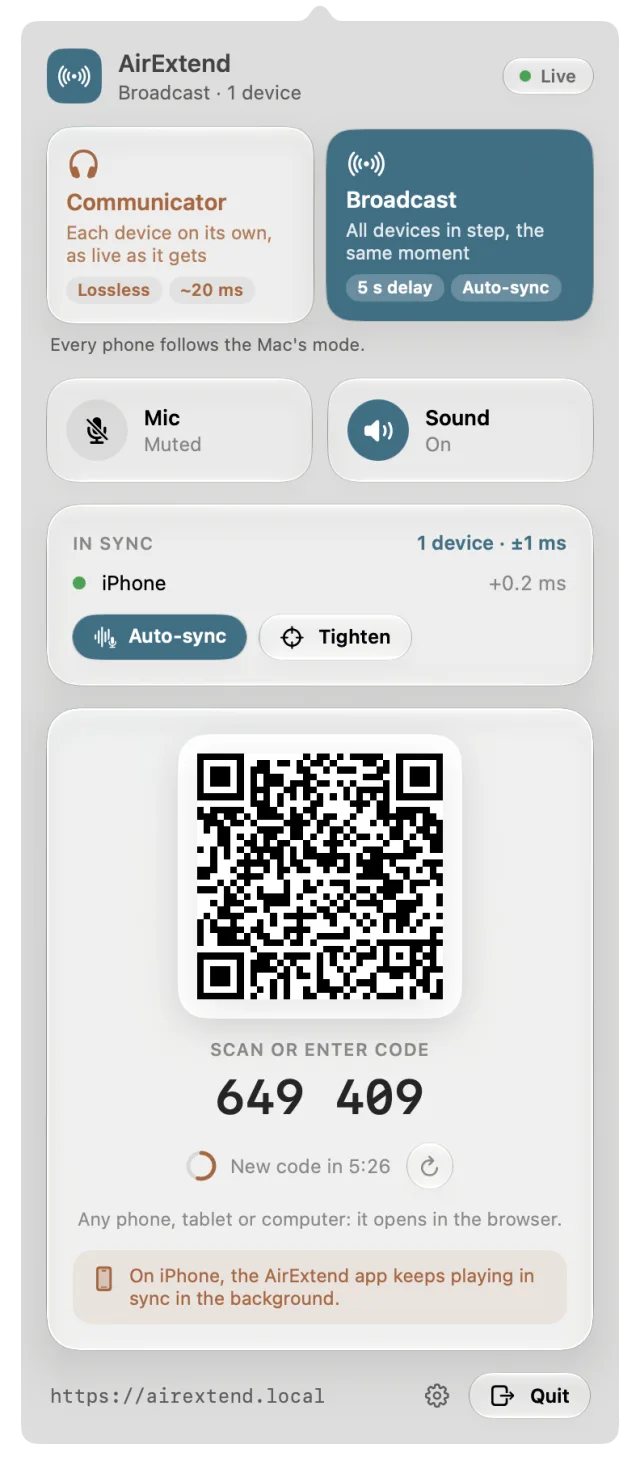
The AirExtend menu-bar panel on a Mac in Broadcast mode: mode switch, mic and sound, devices in sync, pairing QR code and six-digit code.
Mac panel: mode, devices, QR code
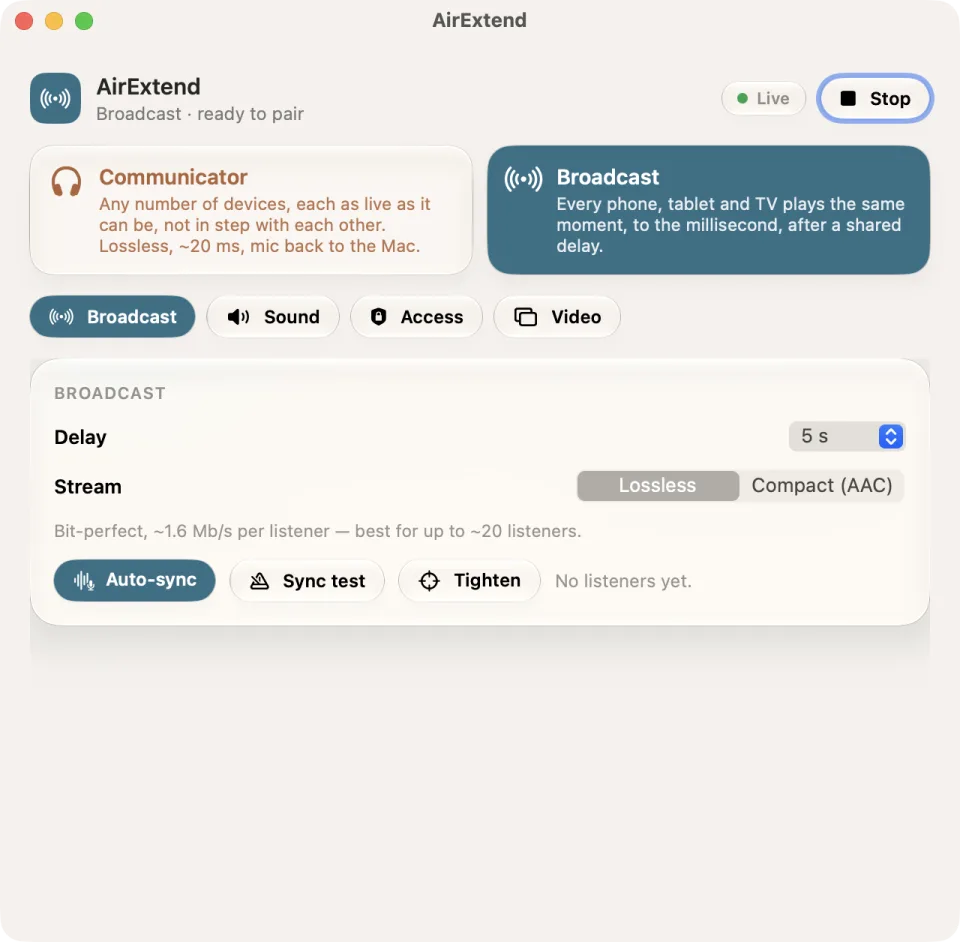
The AirExtend settings window on the Mac, Broadcast tab: shared delay, Lossless or Compact stream, Auto-sync, Sync test and Tighten.
Mac settings: delay and stream
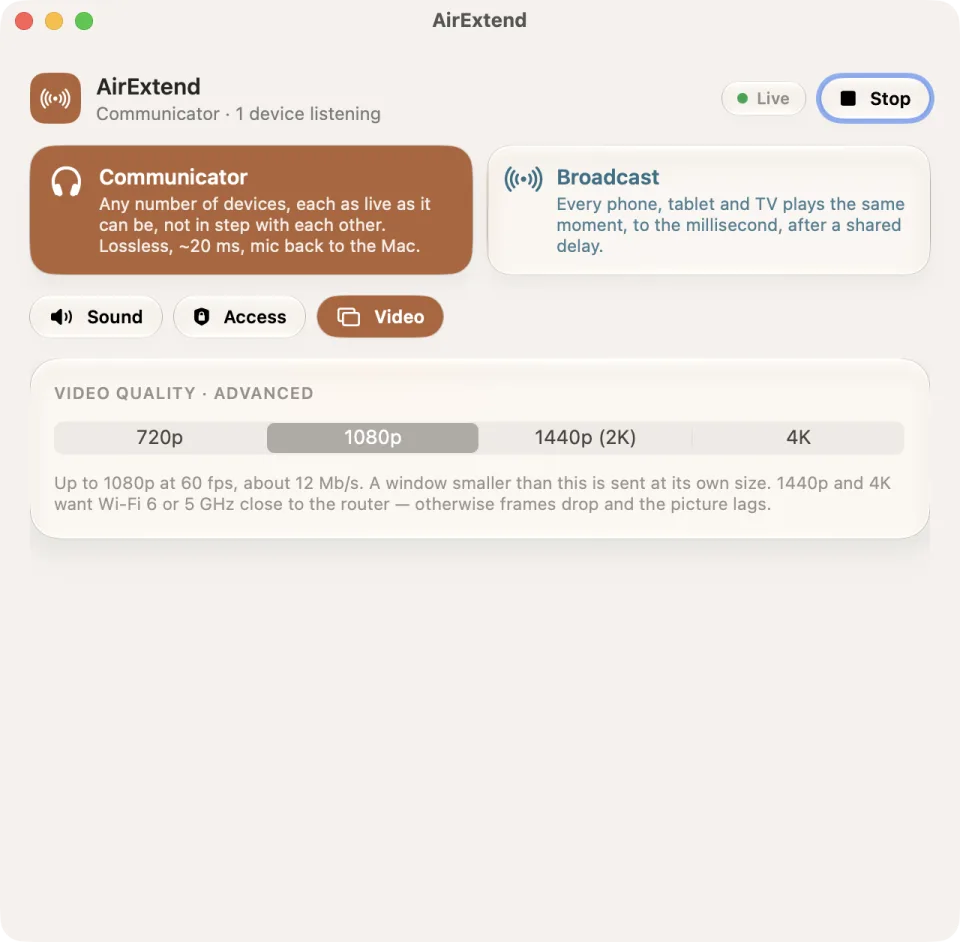
The AirExtend settings window on the Mac, Video tab: picture size and frame rate for the Mac screen.
Mac settings: video quality
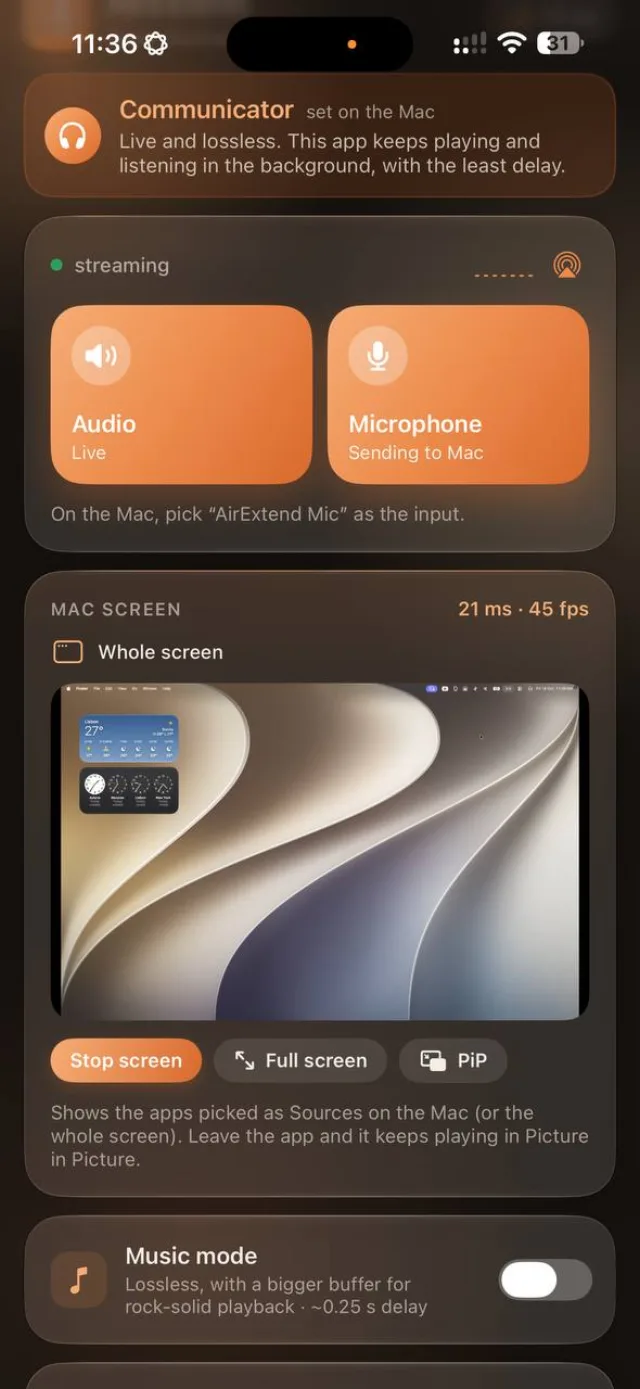
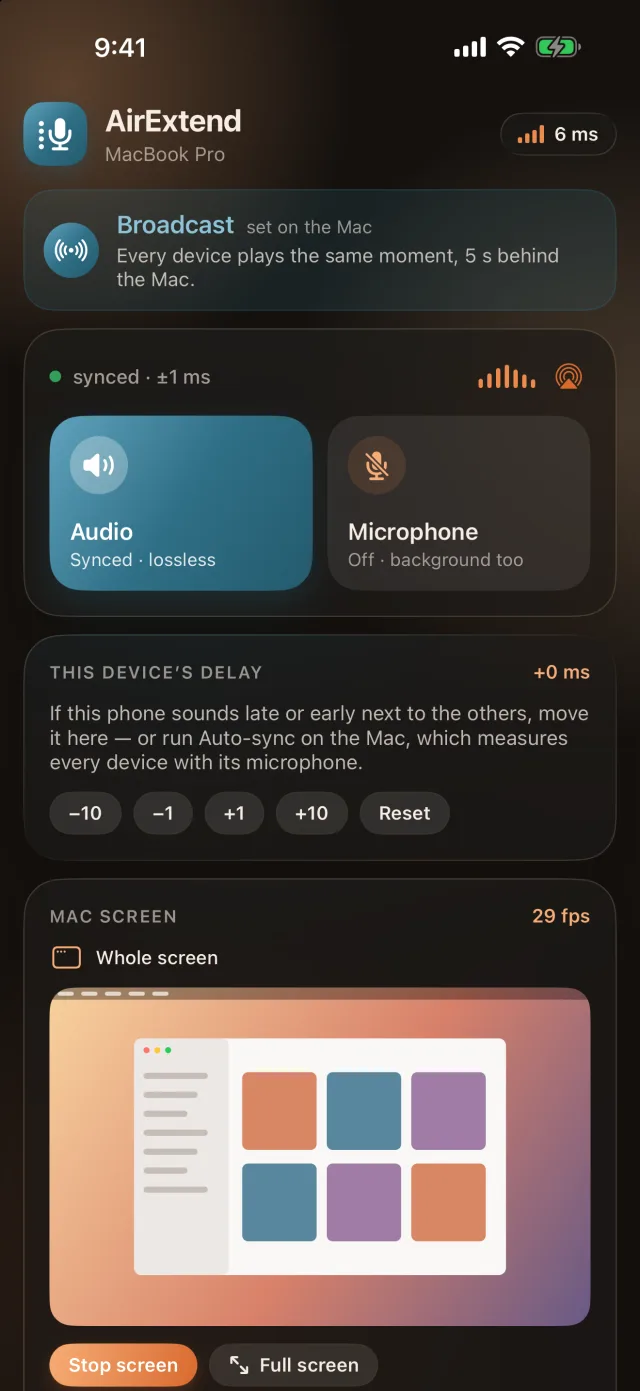
AirExtend on iPhone in Communicator mode: audio live, microphone sending to the Mac, and the Mac screen with Stop screen, Full screen and PiP.
iPhone: Communicator, Mac screen
AirExtend on iPhone in Broadcast mode: synced within 1 ms, this device’s delay trim and the Mac screen.
iPhone: Broadcast, synced
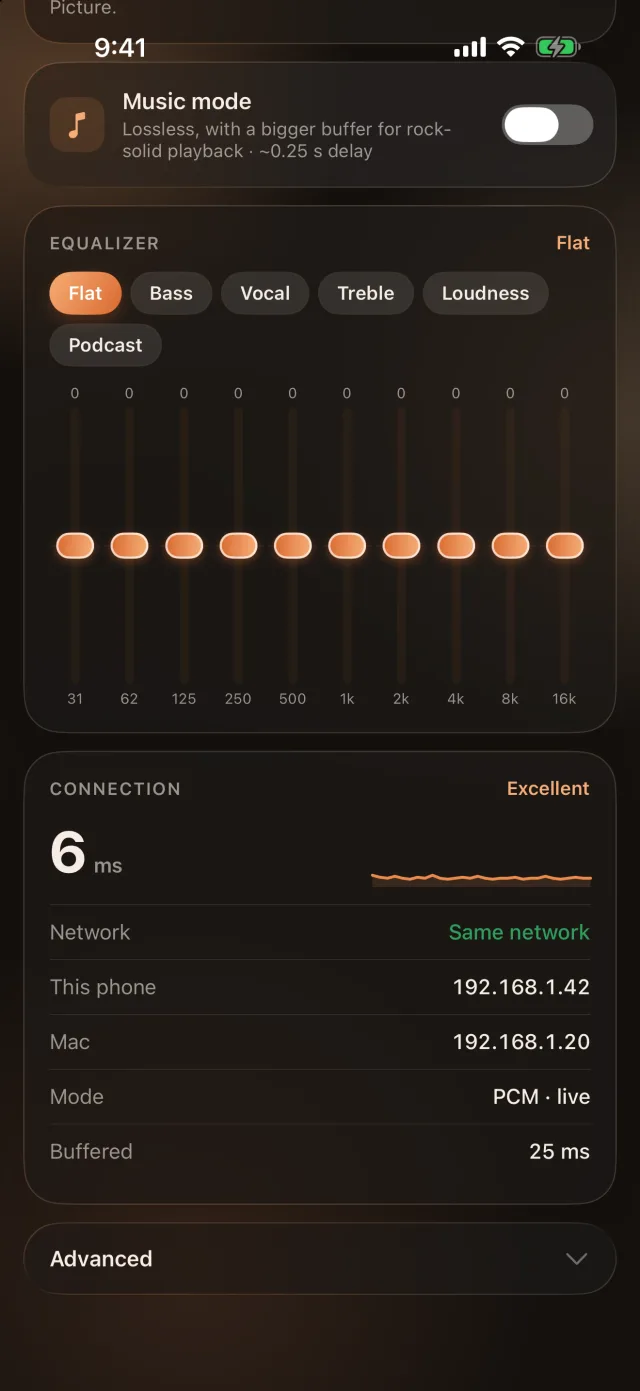
The AirExtend equalizer on iPhone in dark mode: ten bands and presets.
iPhone: equalizer
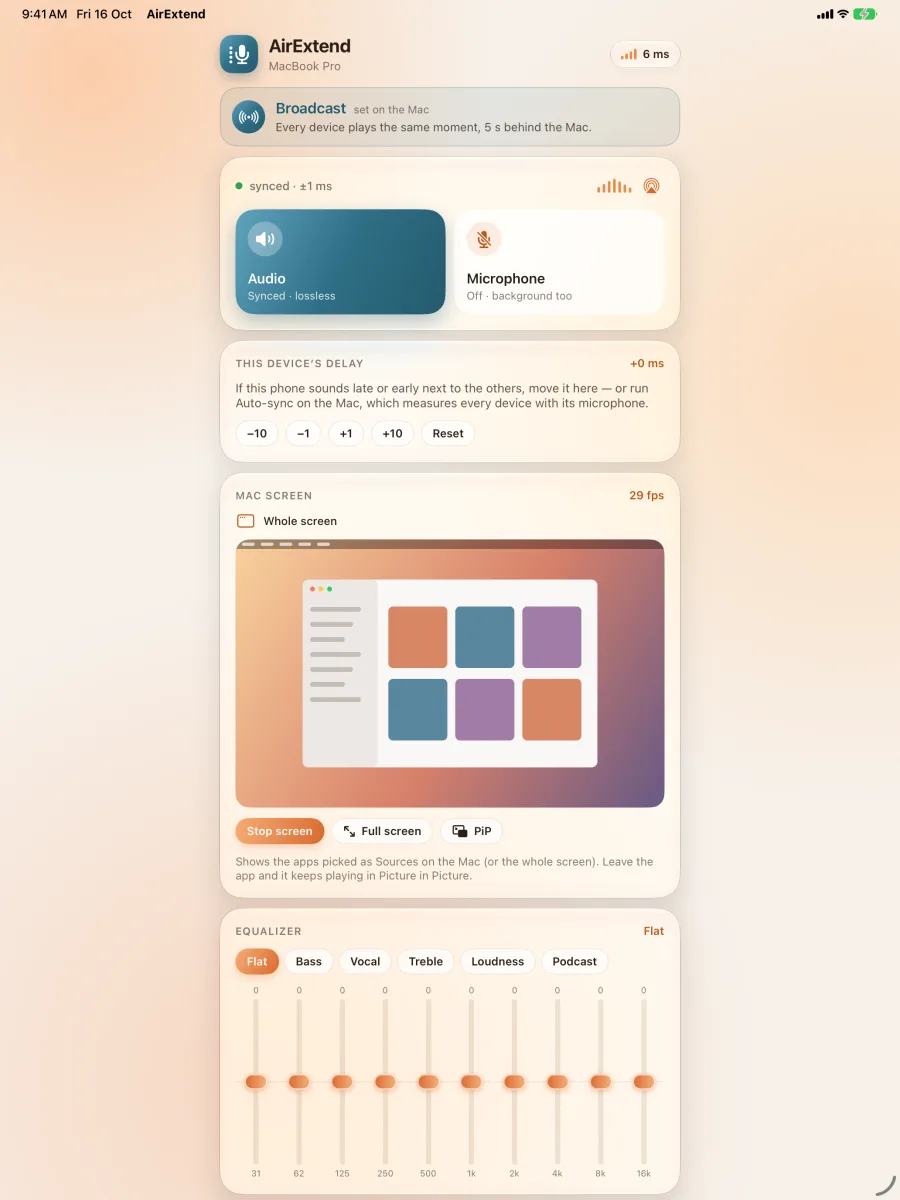
AirExtend on iPad in Broadcast mode.
iPad
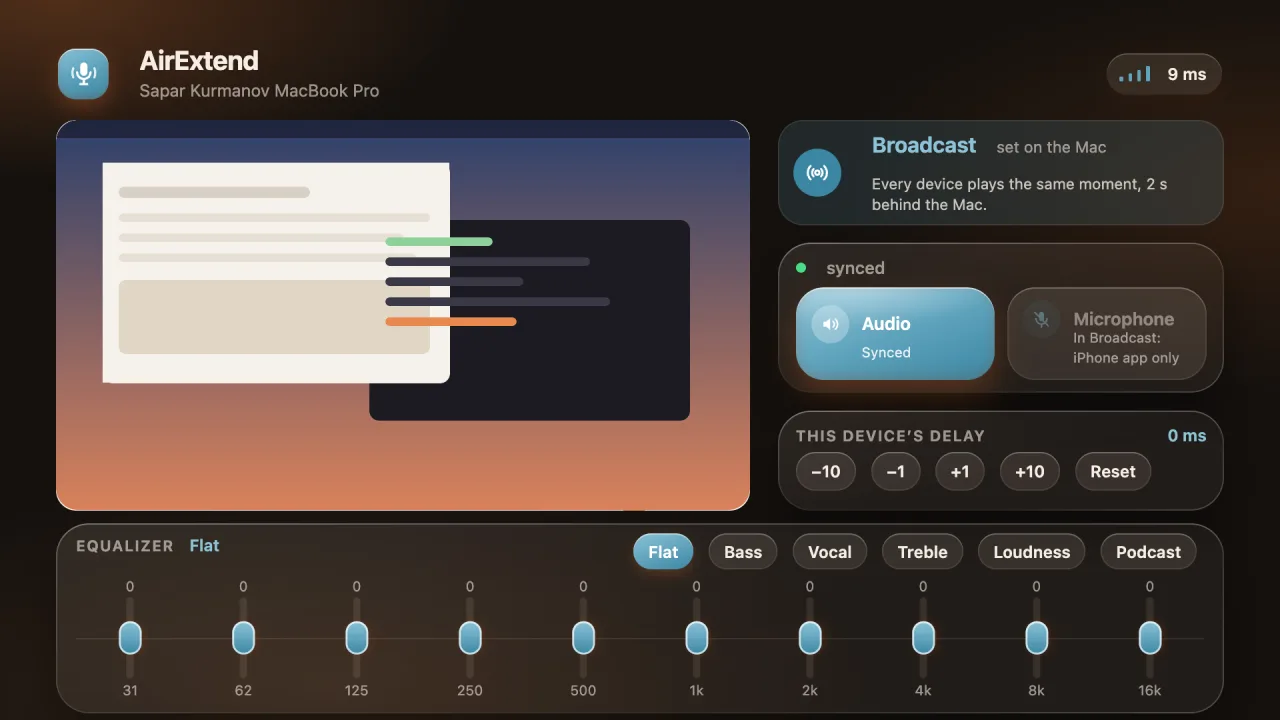
AirExtend on an LG webOS TV: the Mac screen as a tile, Broadcast status, delay trim for this TV and a ten-band equalizer. The Mac screen in the tile is an illustration.
TV: the picture first (in testing)

Where it helps

Smart glasses and earbuds
Ray-Ban Meta glasses or AirPods stay on the phone and still play the Mac’s sound. More
Quiet nights
Films and music on headphones through the phone, the room silent. More
Many phones, one moment
Phones, tablets and TVs in step in a flat, a shop or a hall. More
Conferences
One feed to every attendee’s phone over the venue Wi-Fi, no receivers. Conference page
AirExtend+ for events and companies
Your logo, colours and online forms on attendees’ phones, with the answers saved on your Mac as they arrive. In development. AirExtend+ page
Every function
Setup and what each function does. macOS app Features

Features

Communicator
Lossless sound with about 20 ms of delay, every device on its own, and the phone’s microphone back to the Mac as AirExtend Mic.
Broadcast
One shared delay from 0.3 to 60 seconds, so every phone, tablet and TV plays the same moment. A per-device correction covers speakers, Bluetooth and TVs.
Auto-sync
The Mac’s microphone listens to a short test sound from each device in turn and corrects how late each one sounds.
Music mode
Lossless with a bigger buffer for steady playback, about a quarter of a second of delay. It keeps playing in the background.
Mac screen
Send the whole screen, or the apps you pick, to the phone with the sound kept in step. Full screen and Picture in Picture on iPhone.
Sources
Share the whole Mac or only specific apps, and mute those apps on the Mac while you stream them.
TV
The picture first, full screen on OK, with a Fill screen option. LG webOS and Android TV apps are in testing.
Open access
One switch removes the pairing codes for events: everyone on the Wi-Fi who opens the address can listen.
Equalizer
A 10-band equalizer, plus sound and microphone gain, on the phone.
Transport
Standard: lossless PCM, the lowest delay. For a weak Wi-Fi network: Low data (AAC, 128 kb/s) or WebRTC with Opus, which survives lost packets, adapts to the link and keeps playing in the background in iPhone Safari, with a little more delay and the equalizer off.
Pairing
QR code or a six-digit code that changes every ten minutes, and a local certificate for HTTPS. Pair once per phone.
Reconnects by itself
If the network changes or a VPN starts, the stream is dropped and rejoined within a few seconds.
Get it running

Download the Mac app

Download AirExtend-1.0.7.dmg (14 MB) and open it. It needs a Mac with Apple silicon and macOS 14 or later. Free for the first hour, then a one-time $9.99 unlocks it for good.

Move it to Applications and open it

Drag AirExtend onto the Applications folder, then open it from there. It lives in the menu bar, with no Dock icon. The app is signed and notarized by Apple, so macOS only asks you to confirm opening an app downloaded from the internet.

Install the audio driver, once

Click Install… under Audio driver in the panel and enter your administrator password. The Mac’s sound pauses for a second or two. Allow Microphone, Screen Recording and Local Network when macOS asks.

Pair a phone

Scan the QR code in the menu-bar panel with the phone’s camera, or open the address under it and type the six-digit code. The phone then plays the Mac’s sound. Choose Communicator or Broadcast in the panel.

Download for Mac

Signed and notarized by Apple. Trouble? See support.

Details

Mac
Apple silicon, macOS 14 or later. Capturing a single app needs macOS 14.2 or later.
iPhone and iPad
iOS and iPadOS 17 or later. Free on the App Store.
Other devices
Any current browser on a phone, tablet, TV or computer, including Android and Windows.
Network
The Mac and the other device on the same local network. USB tethering also works.
Audio
48 kHz stereo, lossless PCM. AAC is used for music and talk, and Opus over WebRTC.
Virtual devices
Two audio devices appear on the Mac: AirExtend (output) and AirExtend Mic (input).
Price
Free for your first 60 minutes of streaming, then a one-time $9.99 — no subscription. Payment is handled by Paddle.com, our reseller and merchant of record.
Privacy
Nothing leaves your local network. No account, no analytics.

AirExtend is an independent app by 278labs. It is not made, sponsored or endorsed by Apple, Meta, Ray-Ban or LG. Apple, Mac, iPhone, iPad, AirPlay and AirPods are trademarks of Apple Inc.; Ray-Ban and Meta are trademarks of their owners; webOS and LG are trademarks of LG Electronics.

Questions

What is AirExtend?

AirExtend is a Mac app, with an iPhone and iPad app on the App Store, that streams your Mac’s sound to phones, tablets, TVs and any web browser on your own Wi-Fi, and sends a phone’s microphone back to the Mac. It has two modes: Communicator, where each device is as live as it can be, and Broadcast, where every device plays the same moment in sync.

Is AirExtend free?

AirExtend is free for your first 60 minutes of streaming, counted once across the whole time you use it, not per day. After that, a one-time $9.99 purchase unlocks it for good — no subscription. AirExtend+, for events and companies, is a separate licence.

What do I need to use it?

A Mac with Apple silicon on macOS 14 or later, and a phone, tablet, TV or computer on the same Wi-Fi network. The other device can simply open a web page. An iPhone or iPad with iOS 17 or later can use the AirExtend app instead, free on the App Store.

Do I need an app on the phone?

No. Any modern browser can play the sound, show the screen and send its microphone. The iPhone app adds playback that continues in the background and with the screen locked, the microphone in the background, Picture in Picture, an equalizer and the lowest delay.

How does my phone become a headset for the Mac?

In Communicator mode the Mac’s sound plays on the phone, and the phone’s microphone comes back to the Mac as an input called AirExtend Mic. Whatever the phone is connected to then works as the Mac’s headset: wired earphones, AirPods or smart glasses.

What is the difference between Communicator and Broadcast?

Communicator gives every device its own live stream: lossless sound with about 20 ms of delay and the microphone back to the Mac, with the devices not in step with each other. Broadcast adds one shared delay so that every phone, tablet and TV plays the same moment, which is what you want when several speakers sit in one room. The Mac sets the mode and every phone follows it.

How low is the delay?

In Communicator mode AirExtend adds about 20 ms on a good Wi-Fi network, on top of the phone’s own audio output. Browsers use a larger buffer than the iPhone app. Music mode trades delay for rock-solid playback, at about a quarter of a second. Broadcast mode uses a delay you choose, from 0.3 to 60 seconds.

Can I use Bluetooth headphones or smart glasses?

Yes, through the phone: AirExtend plays on the phone and the phone sends the sound to whatever it is connected to. Bluetooth adds its own delay, often 120 to 250 ms, which no app can remove. In Broadcast mode you can enter that delay for the device so that it still lines up with the others.

What does AirExtend not do?

It works only on the same local network, not over the internet or mobile data. The Mac app is for macOS only. An iPhone cannot act as a Bluetooth speaker for a Mac or a TV, because iOS does not allow it. There is no Android phone or Windows app yet, but their browsers work; Android TV and LG webOS apps are in testing.

Is it safe?

Audio travels only between your devices on your own network, and nothing is sent to 278labs or to a cloud service. A new device connects by scanning a QR code or typing a six-digit code that changes every ten minutes, and wrong guesses are rate limited. There is no account, and the app has no analytics.

How do I install it?

Download the disk image, drag AirExtend to Applications and open it. Click Install in the menu-bar panel to add the audio driver once, which asks for your administrator password. Then scan the QR code in the panel with the phone. The steps are on this page and on the support page.

Can I use Ray-Ban Meta glasses with a Mac without disconnecting them from my iPhone?

Yes. Leave the glasses paired with the iPhone. In Communicator mode the iPhone plays the Mac’s sound and passes it on to the glasses, so the Mac never pairs with them. Bluetooth adds about 120 to 250 ms.

Can I use AirExtend at a conference or event?

Yes. One Mac sends one audio and video feed, and attendees on the venue Wi-Fi listen on their own phones in a browser. Open access removes the pairing codes. The Compact stream is meant for hundreds of listeners, and the real limit is the Wi-Fi. See the conference page for the details.

Can I watch a film at night without disturbing the neighbours?

Yes. Play it on the Mac and listen on headphones through the phone, or watch the Mac’s screen on the phone, where picture and sound stay in step.

Does it work on a TV?

Any TV browser can open the address and show the Mac’s screen and sound. Apps for LG webOS and Android TV are in testing and need the next Mac update, which also adds a 16:9 screen for TVs.

More answers on the support page.