One stream to every phone in the hall.

The Mac in the booth sends one audio and video feed. Attendees on the venue Wi-Fi listen on their own phones. No receivers, no app to install, no cloud.

Why it fits events

No hardware to rent
Attendees use their own phones, tablets and laptops. Nothing to hand out, charge, count or collect.
Join in seconds
Open an address or scan a QR code. Any current browser works; the iPhone and iPad app is optional.
Own headphones, own volume
Each person sets their level and uses the headset they are used to, wired or Bluetooth.
Sound and picture together
The Mac’s screen can travel with the sound, in step, for overflow rooms and people at the back.
Everyone in step
Broadcast mode makes every device play the same moment after a shared delay. Auto-sync measures each device.
Stays inside the venue
No cloud, no account, no analytics. Audio never leaves your network.
Free for now
The Mac app costs nothing. Terms for event support are by arrangement.

Screens

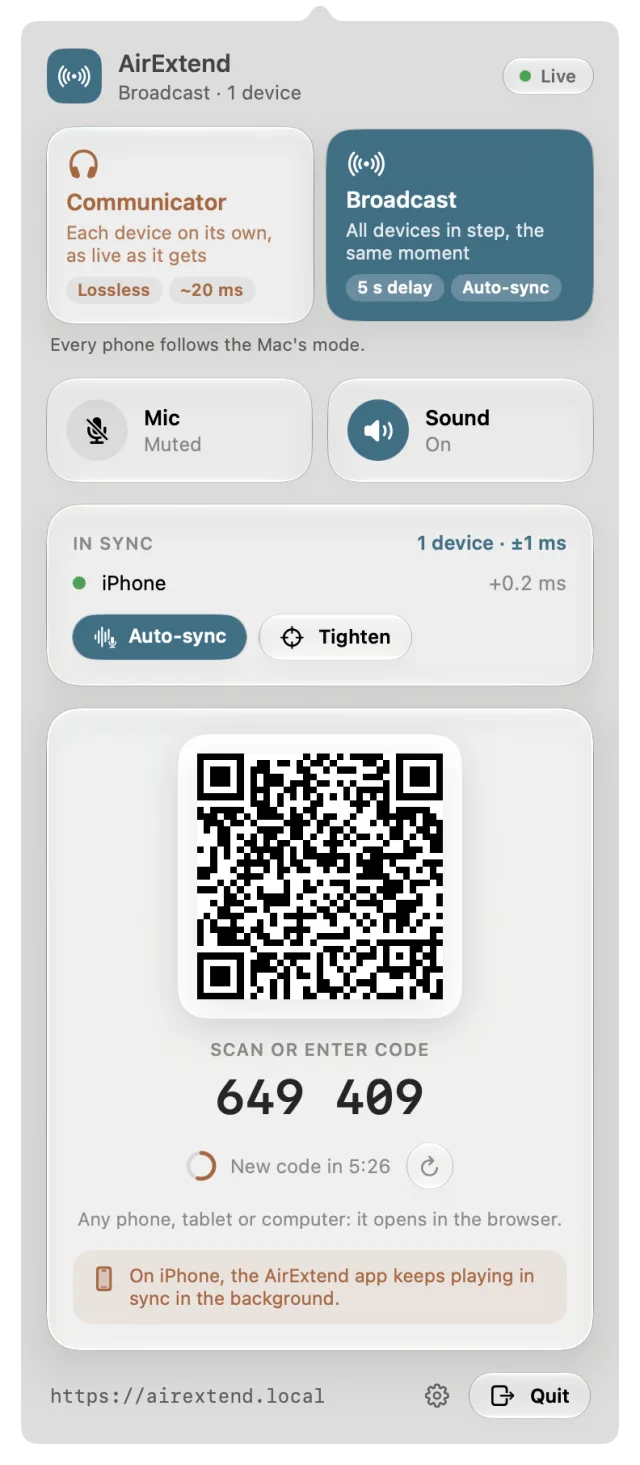
The AirExtend menu-bar panel on the Mac in Broadcast mode: devices in sync, pairing QR code and address.
Mac: the control panel
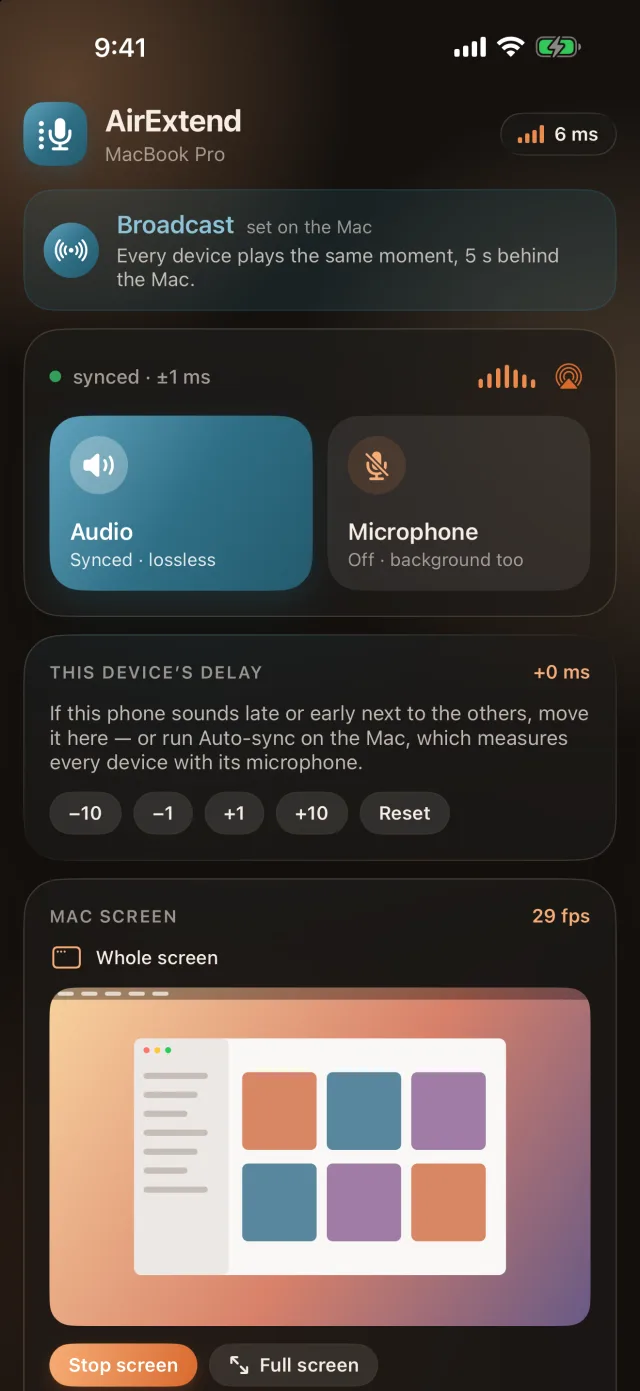
AirExtend on iPhone in dark mode, Broadcast: synced within 1 ms, the device delay trim and the Mac screen.
iPhone, dark mode: synced listening
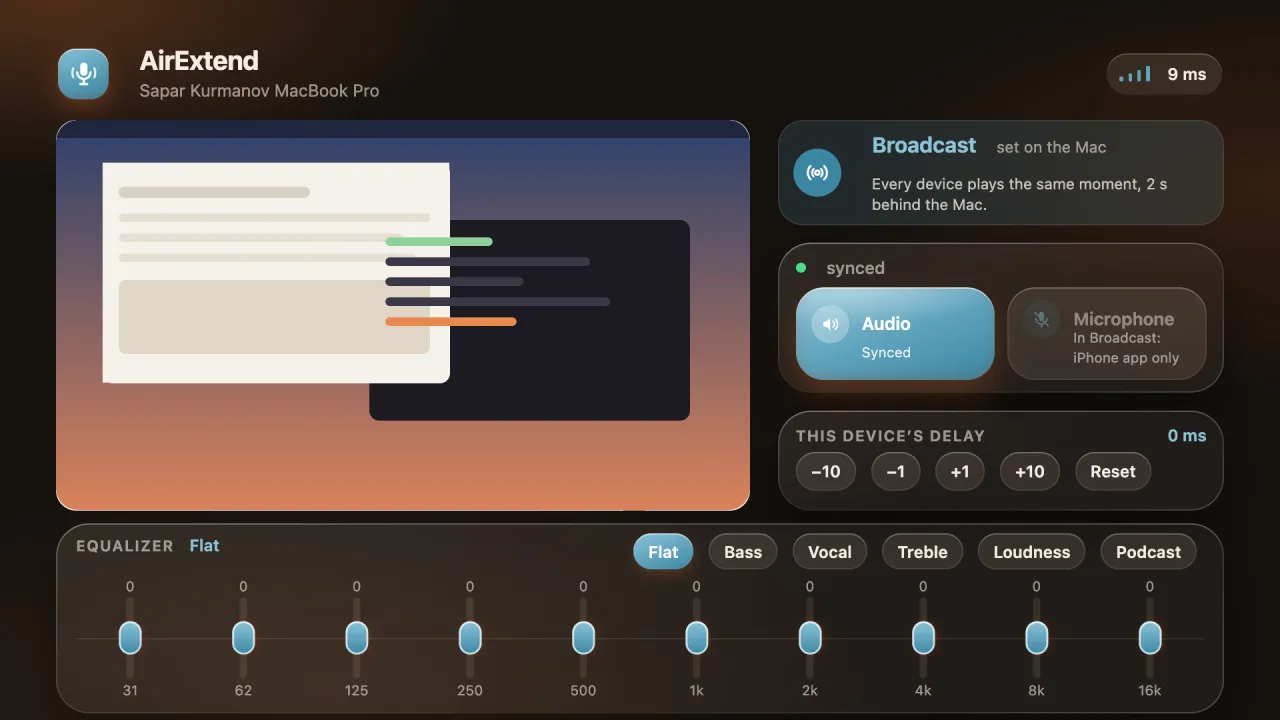
AirExtend on a TV: the Mac screen as a tile, Broadcast status, delay trim and equalizer. The Mac screen in the tile is an illustration.
TV: the picture first (in testing)

Capacity and quality

Capacity is your Wi-Fi’s
AirExtend has no listener limit and no licence count. How many people can listen at once, and at what picture quality, is set only by your Wi-Fi router or access points: their bandwidth, 2.4 or 5 GHz, Wi-Fi 5 or 6, and how many other devices share them. A better network carries more people and a sharper picture.
Picture up to 4K
Up to 3840 × 2160 at up to 60 frames per second. Options: 720p, 1080p, 1440p (2K) and 4K, each up to 60 fps. A window smaller than the chosen size is sent at its own size. 1080p is about 12 Mb/s per device; 1440p and 4K want Wi-Fi 6 or 5 GHz close to the access point, otherwise frames drop.
Sound, lossless or compact
Lossless: 48 kHz stereo, bit-perfect, about 1.6 Mb/s per listener. Compact (AAC): 192 kb/s per listener, for large halls. Broadcast keeps every device in step.
Weak Wi-Fi
Listeners on a poor connection pick Low data (AAC, 128 kb/s) or WebRTC (Opus) on their own page: both cope with lost packets better than the standard stream. WebRTC adds a little delay and turns the equalizer off.
How to size it
Add up the streams: 300 listeners on Compact sound need about 58 Mb/s of Wi-Fi capacity; 100 devices watching 1080p need about 1.2 Gb/s. Spread large crowds across several access points and test with a crowd before the day. These are the app’s own guidance figures, not measurements on your venue.
Who can join

Open access
One switch in the Mac’s settings removes the pairing codes. Everyone on the venue Wi-Fi who opens the address can listen. The Wi-Fi password is the access control: share it with attendees only. Put the address on the slides and the badges.
Paired devices
Without Open access a device pairs once with the QR code or a six-digit code. The code changes every ten minutes, so it suits staff and speakers.
One address
The Mac answers at airextend.local. Android, Windows and TVs use the IP address, which the QR code contains.

How it runs

Put a Mac in the booth

Apple silicon, macOS 14 or later, on Ethernet. Install AirExtend and its audio driver once.

Set the stream

Choose Broadcast, set the delay, and pick Compact (AAC) for large audiences. Choose the sources to share: the whole Mac or chosen apps.

Prepare the network

One network for the Mac and the attendees, client isolation off, 5 GHz access points sized for the crowd.

Show the address

Slides, badges and door signs carry the address or QR code. With Open access on, attendees listen at once.

Check with Auto-sync

Run Auto-sync once with devices in the room. The Mac’s panel lists each device and how far it is from the rest.

Where it is used

Overflow and breakout rooms
The main hall’s talk, with its slides, in the next room.
Lecture halls and training rooms
Sound at the back and on every seat, at each person’s volume.
Exhibition and trade-show stands
Demo sound for visitors on their own phones, without a noisy hall.
Silent conferences
Several rooms, one quiet venue: one Mac and one address per room.
Hybrid events
The local feed for the room, while the remote audience uses its own platform.
Town halls, churches and community halls
Talks for people in side rooms, with the screen if needed.
Museums, tours and galleries
Commentary on visitors’ phones, without rented receivers.
Universities and schools
Lessons on students’ devices over the campus network.

Plain limits

One stream per Mac
No built-in interpretation channels. Another room or language needs another Mac.
Local network only
Not over the internet or mobile data. Remote attendees need another service.
Capacity is the Wi-Fi’s
Compact AAC is 192 kb/s per listener; Lossless about 1.6 Mb/s; video several Mb/s per device. Test the venue network with a crowd before the day.
Not an assistive listening system
It does not replace a hearing loop or a certified system where one is required.
Rights
You are responsible for the right to play the content to your audience.

Questions

What if some attendees have a weak connection?

They choose another transport on their own page. Low data is AAC at 128 kb/s. WebRTC uses Opus, survives lost packets and adapts to the link, keeps playing in the background in iPhone Safari, with a little more delay and the equalizer off. The standard stream stays lossless for everyone else.

How do attendees join a conference audio stream without installing an app?

They open the address of the Mac on the venue Wi-Fi in any current browser, on a phone, a tablet or a laptop. With Open access switched on there is no code to type. The iPhone and iPad app is optional.

Can the QR code or PIN be handed out in advance?

For an event use Open access, which removes the codes: anyone on the venue Wi-Fi who opens the address can listen. The Wi-Fi password is the gate, so give it only to attendees. Devices paired earlier stay paired.

How many people can listen at once?

It depends on the Wi-Fi network, not on a licence. The Compact AAC stream uses 192 kb/s per listener, so 300 listeners need about 58 Mb/s of Wi-Fi capacity, and the app’s own guidance is that hundreds can listen. The Lossless stream is about 1.6 Mb/s per listener and suits around 20. Video uses several Mb/s per device. These are guidance figures, not measurements on your venue.
Does it replace a hearing loop or an assistive listening system?

No. It supplements them. AirExtend is not a certified assistive listening system, and a venue that must provide one still has to.

Can it do live interpretation in several languages?

Not yet. One Mac sends one stream. Several rooms or languages need one Mac each, or a separate interpretation service.

What does the venue Wi-Fi need?

The Mac and the attendees’ devices on one network, with client isolation switched off so that devices can reach the Mac, and 5 GHz access points with capacity for the crowd. Put the Mac on Ethernet. A dedicated network for the event is the safest choice.

Does audio go through the internet or a cloud?

No. It travels from the Mac to each device inside the venue network. Nothing is sent to 278labs, and there is no account and no analytics.

How is it priced for events?

The Mac app is free for now. Event support and terms for organisers are by arrangement: write to sapar@278labs.co.uk.

What can the stream carry?

Whatever plays on the Mac: slides with video, a web stream, a recording or a feed routed into the Mac with an audio routing tool. The Mac’s screen can travel with the sound.

Is a presenter’s voice in the same room delayed?

A phone plays a little after the live voice because the network and the browser add buffer. For people in the room with the speaker, use Communicator (about 20 ms on a good network, more in a browser). For overflow rooms and breakouts the delay does not matter, and Broadcast keeps every device in step.

Talk to us about your event Your brand and online forms: AirExtend+

AirExtend is an independent app by 278labs. It is not made, sponsored or endorsed by Apple, Meta, EssilorLuxottica, Ray-Ban, LG, Google or any other brand named here. Names are used only to say what works with what. Apple, Mac, MacBook, iPhone, iPad, AirPods and AirPlay are trademarks of Apple Inc.; Ray-Ban and Meta are trademarks of their owners; webOS and LG are trademarks of LG Electronics.